
Remote Key Fob for Photo Booths
Four buttons · Any booth action · Operated from your pocket
Four buttons
Each one yours to assign
Lock the booth
One press, from across the room
USB receiver
Plugs into the booth PC
Designed by us
An original Booth Junkie product
Run the booth without standing at it
An operator hovering over the booth screen puts guests off and gets in the way of the photos. The Booth Junkie remote key fob lets you step back: it clips onto your keys or sits in your pocket, and every button sends the booth an instruction from across the room.
Booth Junkie designed the fob itself. It comes in two parts — a small receiver that plugs into the booth PC over USB, and the four-button fob that goes with you.
Checking it is connected
Plug the receiver in before starting Booth Junkie. The General tab of the Options shows whether the receiver has been detected, next to the status of the Animated LED Light Ring, so you know it is working before the doors open rather than when you first reach for it.
Part of the licence
Controlling external devices is included in Standard, so the fob keeps working whether or not Premium is active. Booth Junkie also drives the Animated LED Light Ring and the I-PAC, PacDrive and Phidget control boards.
Four buttons, doing what you choose
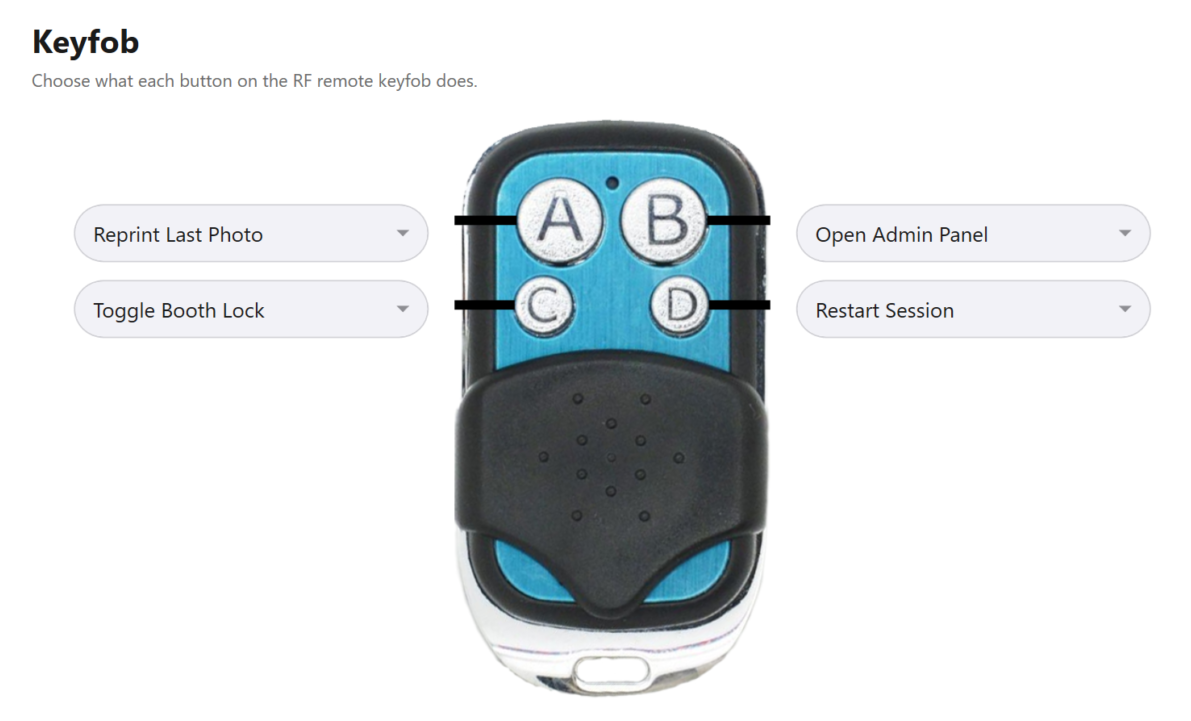
Each button can trigger anything you could assign to a keyboard shortcut in Booth Junkie, picked from a dropdown per button in Admin Panel → Triggers → Keyfob. Press it and the action happens immediately, exactly as the shortcut would.
So the buttons can be whatever the night needs — a reprint for the guest who wants another copy, a jump back to the start, or whatever your events call for most often. Setting up a keyfob goes through it.
In the setup shown here, A reprints the last photo, B opens the Admin Panel, C locks or unlocks the booth and D restarts the session.
Lock the booth with one press
Out of the box, one button locks and unlocks the booth. Locked, it shows an animated lock screen and nothing runs until you unlock it — so you can step away for a break, change the paper or pack the printer without anyone starting a session behind you.
The kit is the small black receiver, which plugs into a spare USB port on the booth PC, and the four-button fob on its keyring. Replacement fobs are sold on their own, so a second operator can carry one, or a lost fob can be replaced without buying the whole kit again.

Try it on your own booth
The free trial runs for 30 days on your own hardware, so you can set the buttons up the way you work before deciding.
Photos carry a watermark until the machine is licensed, and the trial is not licensed for live or commercial events, so use it to test the booth rather than to cover a booking.