
Email Photo Booth Photos to Your Guests
Sent from the booth · Your own mail server if you want · Consent before sending
Typed at the booth
Address checked as it is typed
Sent for you
Or through your own SMTP server
Ask first
Optional consent before sending
No venue wifi needed
The queue sends it later
What happens at the booth
When a guest has their photo, email is offered alongside whichever other sharing options you have switched on. They type their address on the on-screen keyboard — which checks it looks like an email address before letting them carry on — and the photo is sent as a link.
It suits the guests who would rather not hand over a phone number, and the corporate events where an email address is what the client actually wants collected.
Sent for you, or through your own server
Booth Junkie sends guest emails itself, so email works without setting up a mail account first. If you would rather the messages come from your own domain, point it at your own SMTP server instead and they go out through that.
Gmail works as that server too. Google now requires an App Password rather than your normal login for any program sending through it, and the guide to creating one takes a couple of minutes.
What the client gets afterwards
Every email address captured at an event appears in that event’s report in your online dashboard, alongside the shares and views from its gallery — so when a brand activation ends, the list the client was hoping for is already there.
Asking before anything is sent
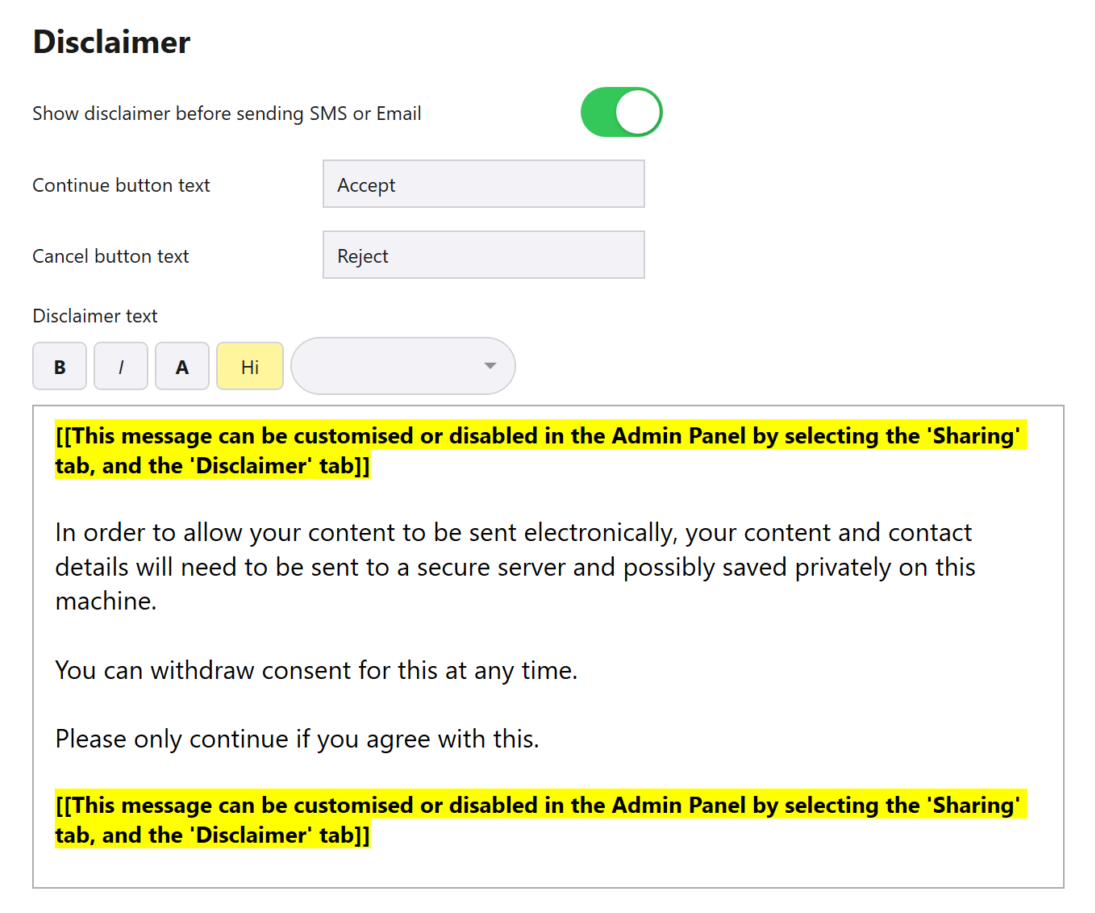
A consent message can be shown before an email goes, so the guest agrees to receive it before their address is used. The wording is yours to edit, and if an event does not need it, it can be switched off.
The same notice is used for SMS as well as email. Its two buttons can be relabelled to suit the event — Accept and Reject to begin with — and the text can be formatted with bold, italics, colour and highlighting, all from the Disclaimer tab under Sharing in the Admin Panel.
The wording it starts with explains that the guest’s photo and contact details are sent to a secure server so they can be delivered, may be kept privately on the booth, and that consent can be withdrawn at any time. Before an event, change it to match your own privacy policy — or your client’s, when a brand activation is collecting data for them.
Venues with no signal
Email does not need a connection at the event. Every message goes into the Upload Queue and sends the moment the booth is online, whether that is straight away or the following morning. A failed send retries on its own, and an address typed wrongly can be corrected and sent again.
Try it on your own booth
The free trial runs for 30 days with every Premium feature switched on, email included, so you can send test photos to your own inbox before deciding.
Photos carry a watermark until the machine is licensed, and the trial is not licensed for live or commercial events, so use it to test the booth rather than to cover a booking.
See everything else the software does, or sending photos by SMS.