
Subscription vs Auto Top-up
| Option | How it charges |
|---|---|
| Subscription | Charged every month, on the same date, adding a fixed number of credits each time – whether you need them or not. |
| Setting Up Automatic Top-ups | Only charges you when your balance actually drops below a threshold you set. |
Subscribe
Credit subscriptions are set up from the same Buy Credits tab as one-off top-ups – look for the subscription option alongside the one-off amounts, rather than a separate page:
-
Open your Credits dashboard and go to the Buy Credits tab
-
Choose the subscription option for the amount you want
-
Complete checkout as normal
Result: Credits are then added to your account automatically every month for as long as the subscription is active.
Manage or cancel your subscription
Once you have an active subscription, your Credits dashboard Overview tab shows its status and next payment date, with a Manage / cancel link – see Your Credits Dashboard.
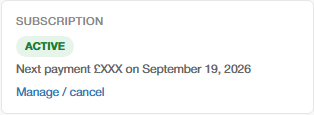
This takes you to WooCommerce’s own subscription management page, where you can view payment history, update your payment method, or cancel.
See also How the AI Credit System Works for what credits are used for, and Buying Credits: One-Off Top-ups if you’d rather make a one-off purchase instead.