
What credits are for
Every time an AI model is used to process a photo, credits are deducted from your account automatically. Different AI models cost different amounts, and you can combine more than one effect on the same photo – each one is charged separately.
Good to know: One balance for every machine
Credits are shared across your whole account, not tied to one machine – preload your balance once, and every licence linked to your account can draw on it.
Current AI pricing
| Model | Cost | Best for |
|---|---|---|
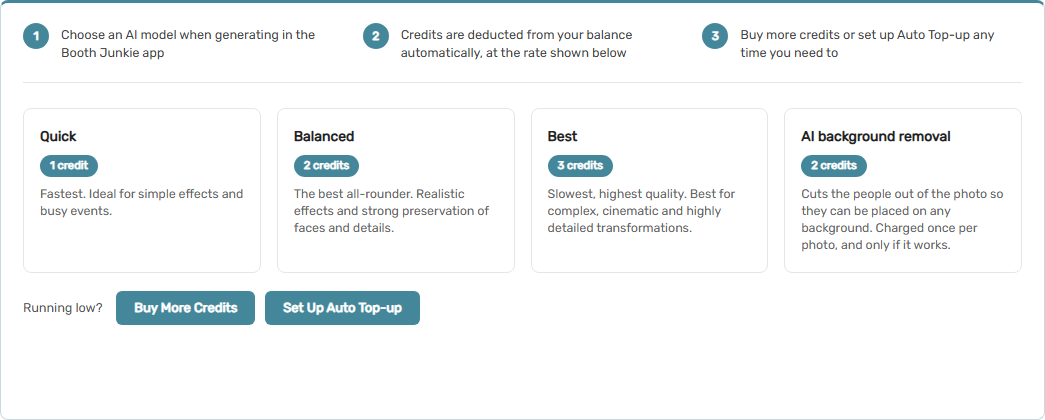
| Quick | 1 credit | Fastest. Ideal for simple effects and busy events. |
| Balanced | 2 credits | The best all-rounder. Realistic effects and strong preservation of faces and details. |
| Best | 3 credits | Slowest, highest quality. Best for complex, cinematic and highly detailed transformations. |
Tip: Check the live prices
Prices can change, so always check the AI Costs tab in Dashboard → AI Credits for the current rates rather than relying on this table alone.
Why you need credits
If your balance runs out, AI features stop working until you top up – the rest of Booth Junkie (photos, prints, sharing) is unaffected, only the AI-powered steps are held back. Because of this, it’s worth keeping an eye on your balance, especially before a busy event.
There are three ways to make sure you don’t run out:
| Option | How it works |
|---|---|
| Buying Credits: One-Off Top-ups | Whenever you need to. |
| Setting Up Automatic Top-ups | Your balance is refilled automatically when it gets low. |
| Setting Up a Credits Subscription | A fixed amount is added every month regardless of your balance. |
Check your usage
Every credit-using action is logged. Go to Dashboard → AI Credits → Transactions to see a full history of what was charged and when, alongside a running balance – and Your Credits Dashboard for an at-a-glance monthly usage chart.
