
Find your dashboard
Log in to your account and go to Dashboard → AI Credits. This is your Credits Overview – it’s the first thing you see whenever you visit the Credits section, and it brings together everything about your balance in one place.
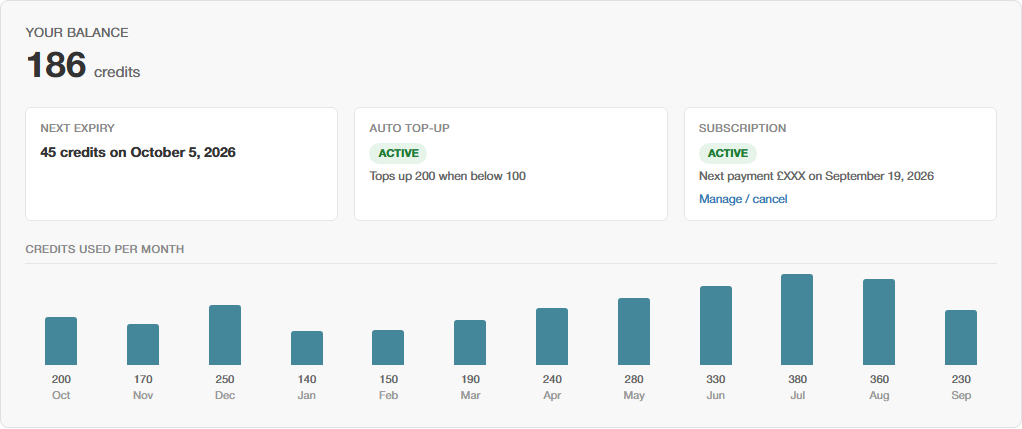
What you’ll see
| Item | What it shows |
|---|---|
| Your balance | The number of credits currently available to spend, shown at the top in large text. |
| Next expiry | If any of your credits are due to expire, this shows how many and when. Credits are used oldest-first, so this only becomes relevant if your balance has been sitting unused for a while. |
| Auto top-up | Whether automatic top-ups are switched on for your account, and if so, what amount and threshold you’ve set. See Setting Up Automatic Top-ups. |
| Subscription | Whether you have an active credits subscription, when its next payment is due, and a link to manage or cancel it. See Setting Up a Credits Subscription. |
| Credits used per month | A simple bar chart showing how many credits you’ve used over recent months, so you can see your usage pattern at a glance. |

Get to the rest of the Credits section
The same page also has tabs along the top for buying more credits, viewing your full transaction history, managing auto top-up, and checking current AI pricing – see How the AI Credit System Works for what those cover.