
Photo Booth Software You Buy Once
Windows 10 · No monthly fee · Try it free for 30 days
No monthly fee
A Lifetime Licence, paid once
150+ AI prompts
Ready-made, one click to use
800+ templates
One click to install
Free for 30 days
Every feature, on your own booth
$435* for a Lifetime Licence normally $645*
Paid once. The licence is for your booth PC and does not expire, and it comes with twelve months of Premium: 150+ ready-made AI prompts, the 800+ template library, WhatsApp, SMS and email delivery, the online event gallery, cloud uploads, and software updates with remote support.
*Dollar amounts are approximate, at today’s exchange rate. The licence is priced in pounds sterling: your card is charged £333 (normally £495), and your bank converts it to dollars at its own rate. No sales tax is added.
- One payment, no subscription
- 12 months of Premium included
- No charge per message or per event
- Keeps working after Premium ends
Or try it free for 30 days first
One click to a new look
150+ ready-made AI prompts. Booth Junkie 10 has a library of AI styles built in: comic book, crayon drawing, pop art, winter scenes and many more. Pick a style with one click and every guest’s photo comes out in it. There is no prompt to write, and new styles appear in the library automatically.
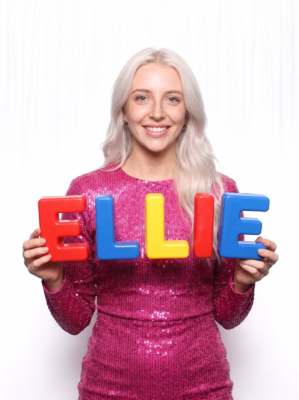



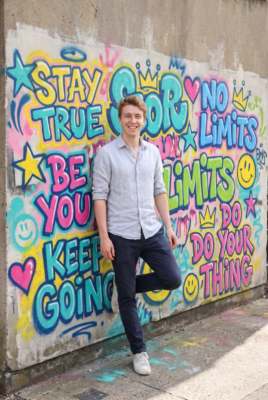

A few of the styles in the library, changing as you watch. Each is one click to use, with no prompt to write.
800+ print templates, one click to install. The Template Library sits inside the software. Browse by category or orientation, click a design, and it is installed and ready for your next event, in landscape or portrait.
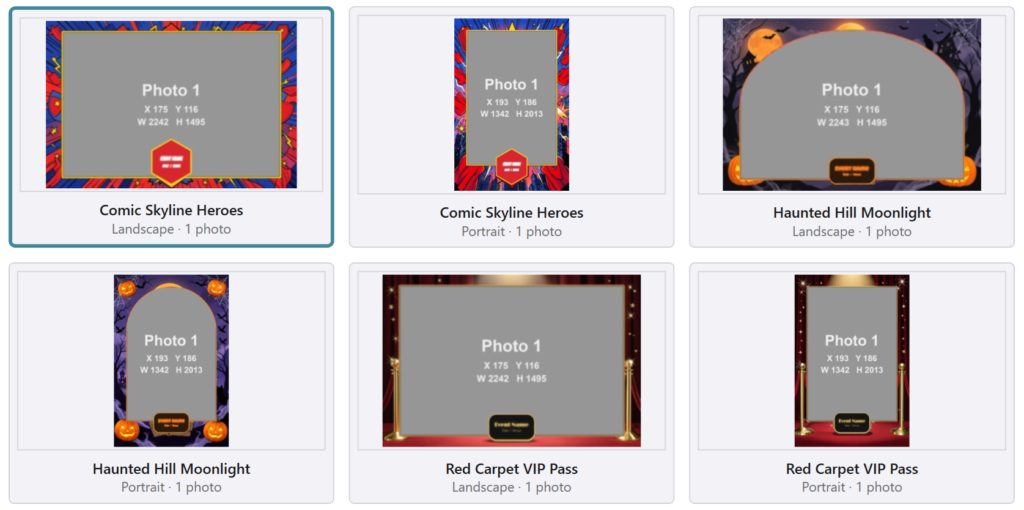
Both come with Booth Junkie 10 and an active Premium, which every licence includes for its first twelve months. AI effects are processed online, so an event using them needs an internet connection, and each photo uses AI Credits from your account.
Photo booth software without the subscription
Booth Junkie is photo booth software for Windows, and it has been supplying the photo booth industry for 10 years. It is sold as a Lifetime Licence: you buy it once for the PC inside your booth, and there is no monthly or yearly fee to keep it running.
Booth work comes in waves. Wedding season, the holidays and corporate events are busy, and the months in between are not. With a licence you own, the software costs the same whether you take one booking this month or twenty, and a quiet winter costs you nothing.
When the twelve months of Premium end, nothing stops. The licence stays valid, the booth keeps capturing and printing, and your photos are never watermarked again. Renew Premium whenever it suits you, ahead of a busy season for example, or carry on without it. How a one-time purchase works has the detail.
Runs the booth you already have
One install runs an enclosed booth, an open-air booth, a selfie pod or a mirror booth, so a second booth type is not a second product to learn.
It drives Canon DSLR and mirrorless cameras over USB, including the Rebel bodies most booths are built around, such as the Rebel T7, T8i and SL3, with exposure set from the Admin Panel rather than the camera’s dials. A standard USB webcam works too. See the supported camera list.
It prints through Windows, so any printer Windows can print to will work, from a dye-sub event printer to whatever is on the desk, with single prints, strips and multi-shot layouts. Printers and running costs goes into the detail.
See it running on a mirror booth
Shown on the Booth Junkie 10 beta. Watch it on YouTube.
Getting the photos to your guests
Booth Junkie sends the photos itself. WhatsApp goes straight to the guest’s phone over the official WhatsApp Business Platform, with no app for them to install. SMS texts it to their phone, US numbers included. Neither is charged per message. Email, an online gallery for the whole event, and uploads to Dropbox, Google Drive or FTP are there too.
Everything goes through the Upload Queue, so a venue with no wifi is not a problem: the booth keeps the photos and sends them the moment it is back online. With Booth Junkie 10 and an active Premium you can add AI photo effects as well.
Buying in three steps
A licence is tied to the PC it runs on, so you buy it for a key the software gives you:
- Download the free trial and install it on your booth PC.
- Copy your licence key. It is on the loading screen when the software starts, and in the Admin Panel.
- Buy the licence, entering that key on the licence page. The machine is then licensed and the trial watermark goes.
The trial runs for 30 days with every Premium feature switched on, so you can prove the whole setup on your own camera, printer and templates first. Photos carry a watermark until the machine is licensed, and the trial is not licensed for live or commercial events.
Questions people ask
Is it a subscription?
No. The licence is bought once for the PC and does not expire. Twelve months of Premium are included, and renewing Premium after that is optional.
Will I be charged in dollars?
Your card is charged in pounds sterling, £333, and your bank converts it to dollars at its own rate. Most US cards handle this automatically; some add a foreign transaction fee, so check with your bank if you are unsure. No sales tax is added.
Does it work with my Canon Rebel?
Most likely. The supported camera list gives each model’s Rebel name, from the Rebel XS to the T8i and SL3, alongside Canon’s EOS R mirrorless bodies. If yours is not listed, get in touch before you buy, or test it with the free trial.
How many booths does one licence cover?
One licence is for one PC. Each booth you run needs its own licence.
Can it run a mirror booth?
Yes. The same install runs a mirror booth, with full-screen animations, infrared touch frames and lighting that switches off before each photo so it never shows in the glass. See mirror booth software.
How do updates and support work?
Both are delivered online, so they work the same wherever your booth is. Booth Junkie is used in about 80 countries, and twelve months of updates and remote support come with every licence.
What do the AI prompts and template library need?
Booth Junkie 10 and an active Premium, which every licence includes for its first twelve months. AI effects are processed online, so they need an internet connection at the event and use AI Credits from your account.
Try it on your own booth
The quickest way to know whether it suits you is to run it with your own camera, printer and templates. Download the 30 day trial, or buy the licence if you are ready. Comparing options? The best photo booth software for Windows puts eight programs side by side.