
Magic Mirror Photo Booth Software
Prebuilt or DIY mirrors · Windows 10 · Bought once, not rented
Any mirror build
Prebuilt, DIY or selfie pod
Full-screen animations
Built in, made for big screens
Lighting on cue
LEDs off before the shot
Bought once
A lifetime licence, not a rental
Software that fits the mirror, not the other way round
Booth Junkie is Windows software rather than something built into one make of cabinet, so it runs a prebuilt magic mirror or one you have built yourself in exactly the same way. Screen layout, camera position, lighting and printer are all configured in the Admin Panel to match the mirror in front of you.
The same install also runs a selfie pod, an open-air booth or a traditional enclosed booth, so a mirror is not a separate product with its own licence and its own learning curve. It runs on Windows 10, on the PC inside the mirror.
Every screen laid out for your glass
Everything a guest sees on the mirror is yours to arrange, per event. The Screen Layout editor gives each stage of a session — the animation, the shot selection, live view, the print and the preview — its own layout, and every element on it can be moved, resized or hidden.
The infrared touch frames that most mirror glass uses work exactly like any other touchscreen, with no extra setup. Live view is sized to match the screen, in portrait or landscape, so guests see themselves in the right shape while they pose. With green screen switched on they can step through your backgrounds on the live feed before taking a single photo, and several people can sign on the touchscreen at once, so nobody queues to add their name.
Guests can add emoji, stickers and stamps, sign in a fixed spot or draw across the whole photo, and see it full screen before it prints — with a retake if they want one. Connect a second screen and a slideshow shows the event’s photos as they are taken.
Big animations, made for a big screen
A mirror is a huge screen, and guests expect it to be filled. Booth Junkie has full-screen animations built in, and they run just as well across a large mirror as on a regular booth — the same animations, the same install, whichever you are running tonight.
A mirror standing idle at an event has one job: to get someone to walk up and touch it. The idle screen loops an animation for as long as it takes — “touch me to take a selfie” — and the session starts the moment a guest taps the glass. Use the built-in animations, or your own in MP4 and most other common formats, with your logo overlaid and a sound effect if you want one.
Short timed clips can sit either side of the capture, and if a guest walks away mid-session, a selection timeout returns the mirror to its idle screen after 30 seconds on its own.

Lighting that stays out of the glass
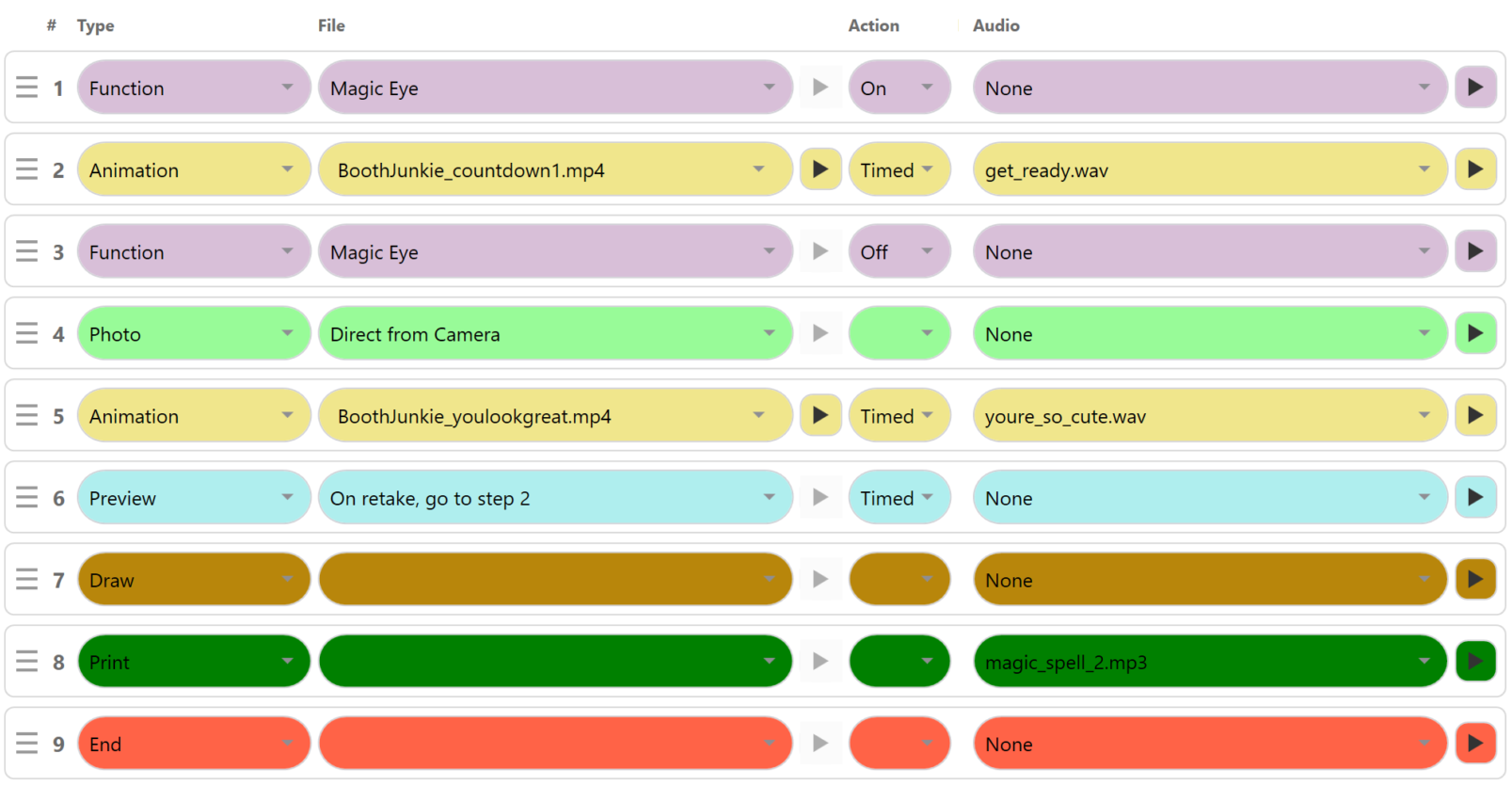
A light that helps the camera can ruin the shot on a mirror, because the glass reflects it straight back into the lens. Booth Junkie switches lighting from inside a session: a step in the workflow turns a device on or off at exactly the moment you choose.
The Booth Junkie Animated LED Light Ring was made for this. Booth Junkie developed the original, and it has gone on to become one of the best-selling photo booth accessories on the market. It clips straight onto the camera lens and plugs in over USB with no relay board, and its animations — programmable to suit the event — light up around the lens while the guest gets ready, drawing their eyes to the camera instead of their own reflection.
Booth Junkie also drives the I-PAC, PacDrive and Phidget control boards, and a PBUK Magic Eye. Whatever is lighting the guest, the usual setup on a mirror is to switch the LEDs off just before the photo is taken, so the light never appears in the glass — and back on again afterwards.

Camera, printing and getting the photos out
Booth Junkie drives Canon DSLR and mirrorless bodies directly over USB, with live view on the mirror, and a standard USB webcam works too. It prints through Windows, so any printer Windows can print to will work (printers and running costs), with template-based single prints, strips and multi-shot layouts in portrait or landscape.
Photos go home by WhatsApp, SMS or email, or into an online gallery. Everything passes through the Upload Queue, so a venue with no wifi is not a problem: the mirror collects the lot and sends it the moment it is back online. Photo booth software for Windows covers cameras, printing and delivery in more detail.

When the glass needs attention
Many mirror booths detect touch with a frame of infrared LEDs around the edge of the glass, and those fade over time rather than failing all at once. Booth Junkie repairs touchscreens and can replace the entire glass system on a Magic Mirror at the same workshop.
Bought once
Booth Junkie is not subscription software. A licence is bought once for the machine and does not expire.
Every licence includes twelve months of Premium: WhatsApp, SMS and email delivery; the online event gallery, with guests sharing to Facebook and automatic Facebook uploads; Google Drive, Dropbox and FTP upload through the Upload Queue; AI processing and prompt presets; the per-event Data Capture Report; new templates and animations from the Content Catalogue; payment module support; and software updates with remote support. The features page sets out what is Standard and what is Premium.
When those twelve months end the software carries on working and the licence stays valid — the Premium features pause until you renew, whenever that suits, or you carry on without them.
Choosing mirror software? Every program in our photo booth and magic mirror software comparison runs mirrors, and it shows where they differ.
Try it on your own mirror
The free trial runs for 30 days with every Premium feature switched on, so you can prove the whole setup on your own mirror — your camera, your screen, your printer and your templates — before deciding.
Photos carry a watermark until the machine is licensed, and the trial is not licensed for live or commercial events, so use it to test the mirror rather than to cover a booking.
See everything the software does, or start with the knowledgebase if you would rather read how something works first.