
Set it up
-
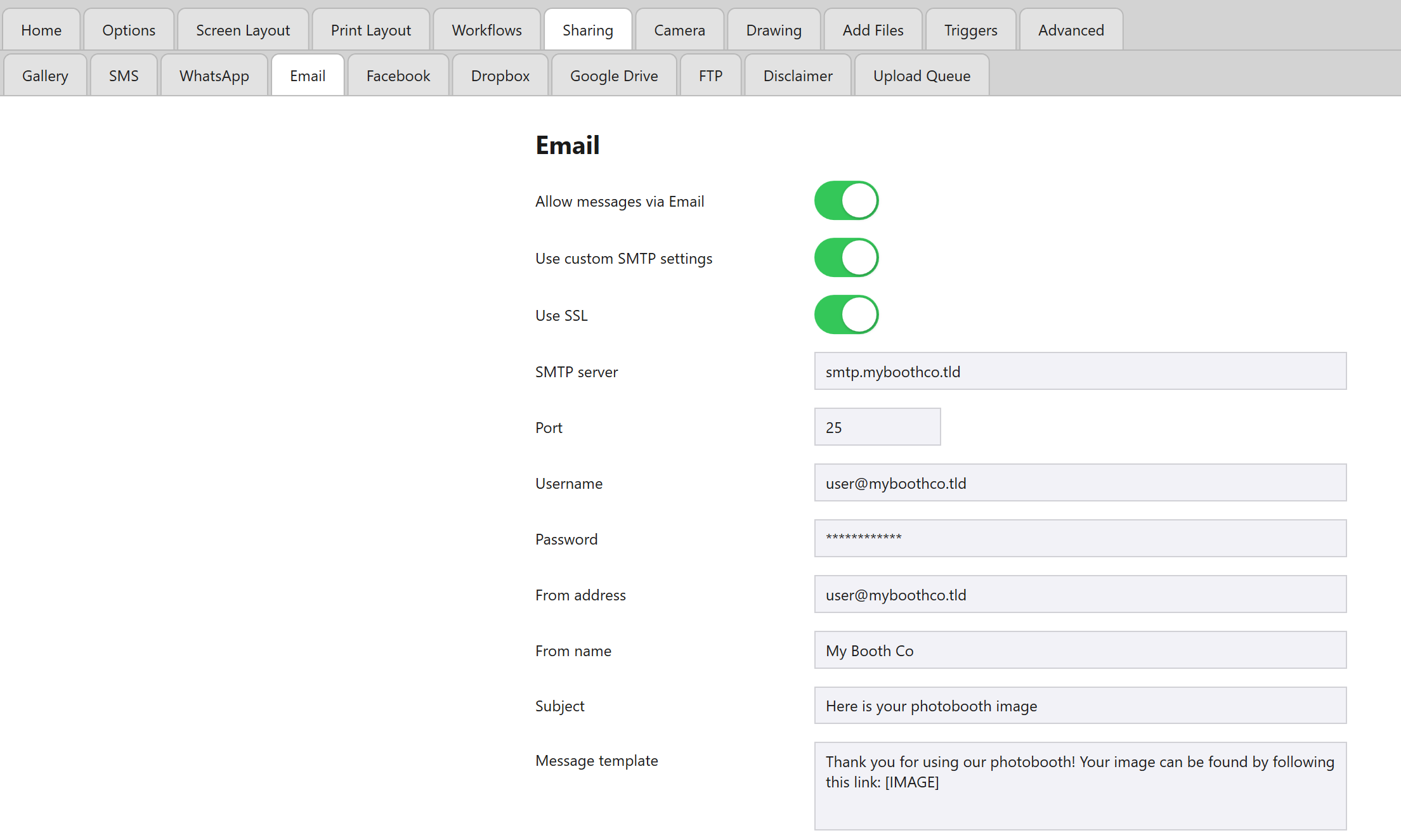
Open the Admin Panel and navigate to the Sharing tab, followed by the Email tab, and switch on Use custom SMTP settings.
-
Set Use SSL, then fill in SMTP server, Port, Username, Password, From address and From name.
-
Customise the Subject and Message template that guests receive alongside their photo.
Both can include a Data Capture step’s token, such as
{NAME}, which is replaced by what the guest answered – see Using a Guest’s Name in Prints, Messages and AI Prompts.
Premium: Fill in all three, or Premium is needed
Make sure SMTP server, Port and From address are all filled in. If SMTP server is empty, the email goes through Booth Junkie’s own mail server instead, which needs an active Premium.
Use a Gmail account
Gmail can be used to send guest emails, but a plain account password won’t work for it any more – Google requires an App Password instead of your normal login password for any third-party app sending through Gmail’s SMTP server. See Creating a Gmail App Password for Email Sharing for the step-by-step process.
| Setting | Value |
|---|---|
| Username | Your Gmail address |
| Password | The App Password you generated (not your normal Gmail password) |
| SMTP server | smtp.gmail.com |
| Port | 465 |
| Use SSL | On |
| From address | Your Gmail address |